Match Amplified: the agentic architecture under the hood
- Jesús Rojo Martínez
- 30 Apr, 2026
- Updated 08 May, 2026
Match Amplified: The Agentic Architecture Under the Hood
This is the technical companion to the Match Amplified product case and part of a series of articles on Match Amplified. The product case covers the why and the what; here we go under the hood, including among others the agentic system, data flows, key decisions and learnings. The agentic backbone was designed during the AI Agents Buildathon and has been extended substantially since. Match Amplified is now in a multi-user alpha state, close to beta.
Table of contents
Open Table of contents
Why (multi-)agents?
Why AI agents in the first place?
The system needs three things:
- Job matching needs semantic understanding (skill and role equivalence: “Product Manager” ≈ “Product Owner”). Deterministic keyword matching produces irrelevant results.
- CV and cover letter tailoring needs natural-language generation grounded in the user’s profile and the specific posting. Classic deterministic code cannot reach the required quality.
- Adaptive learning (extracting tone, formality and structure from approved documents) requires LLM understanding, not rule-based parsing.
Why split into multiple agents instead of one big LLM call?
A single super-agent collapses the design space. Splitting the work buys three things at once:
- distinct autonomy levels per agent. Separation of concerns enforced by design. (Matcher discovers freely, Composer requires explicit approval, Adapter changes things slowly inside a small window);
- cleaner guardrails (soft constraints in the prompt, hard ones in the orchestration layer outside it);
- per-agent model choice (cheap and fast for the Job Scorer, more capability for the Composer’s prose).
The multi-agent shape isn’t aesthetic. It’s how you keep autonomy honest.
The agents
Matcher / Job Scorer
The Matcher discovers job postings and scores them against your profile. The LLM-driven scoring lives inside the Job Scorer: a structured-output call producing a fit score and a written rationale per posting. Today both run inside a single workflow, a Buildathon-era legacy.
Scoring uses semantic weighted matching across job title, must-have skills, nice-to-have skills (both compared semantically rather than as exact strings), location and freshness. Three triggers reach this logic: a daily cron at 6am GMT iterating across all active users; a post-onboarding instant-match path that scores a new user’s profile against job postings already in the DB so they see results within seconds rather than waiting for the next cron; a single-Job URL submission path that invokes the Job Scorer directly via the Job URL Pipeline.
One honest caveat: the engine currently works with a single curated jobs source as part of the MVP. Multi-source discovery is on the roadmap.
The planned split is cleaner: Search agent(s) for job discovery, a deterministic Matcher workflow for pre/post-processing and the Job Scorer for the LLM-driven fit calculation. More distinct separation of concerns, a foundation for multi-source (multi-agent) discovery.
Autonomy: full over discovery, zero over action. Never applies on a user’s behalf.
Composer
The Composer generates tailored CVs and cover letters per job. Output is RAG-grounded against the user’s baseline CV: the LLM doesn’t invent experience, it reframes what’s already there for the specific role. Formal factuality verification (LLM-as-judge) is on the roadmap; for now, the grounding mechanism itself and a rather low temperature setting are what keep outputs honest.
The pipeline is straightforward. Markdown is generated first, the user reviews it, on approval the system runs Markdown → HTML → PDF and stores the result in Supabase Storage. Multiple drafts per role are supported; older drafts are auto-rejected when a new version is generated, so a user iterates freely without losing the trail.
Autonomy: guarded. The Composer generates freely, but no document becomes a PDF without an explicit human approval click. That gate isn’t a UX flourish; it’s the architectural boundary between the AI suggestion and the document the user owns.
Adapter
The Adapter learns from the user’s edits and approvals over time. It refines tone, formality and structural preferences, so each successive document sounds more like the user and less like generic LLM output.
It runs nightly at 2am GMT inside a deliberately conservative window. Each cycle adjusts style preferences by no more than ±5% and it requires at least three approved documents before it changes anything. The ±5% bound prevents large drift from one noisy signal; the three-document threshold prevents over-fitting to a single approval.
Autonomy: full, inside a small auditable window. Roadmap: granular in-text edit tracking is not yet built. Once shipped, the Adapter will learn from which sentences changed, not just from whether the whole document was approved.
CV Parser and Job Scraper
The CV Parser and Job Scraper aren’t fully autonomous agents in the strictest sense. They’re closer to single LLM calls with structured output. But they do real work: extracting skills, titles, requirements and other semantic signals from messy CV uploads and job-posting HTML, so the rest of the system has clean structured data to reason over.
Why structured-output LLM calls beat regex or rule-based parsing here: real-world input variety (PDFs with inconsistent layouts, HTML from a hundred different job boards) breaks rule-based parsers quickly. An LLM with a schema handles the variability and gets better as the underlying model improves, with no code change on our side.
Why they’re not classified as full agents: deterministic invocation, defined output schema, no decision about what to do next. Closer to “smart utilities” than “agents that decide.”
Orchestrator
The Orchestrator was a Buildathon-era AI router: a single agent that read a user’s input and decided which downstream agent to call. Central to NextStep and its chat interface; currently inactive.
Post-Buildathon refactors connected UI elements directly to the agents they need, which is simpler and faster for a small set of well-defined user actions. The Orchestrator becomes relevant again the moment a conversational interface ships (chat-style “make this CV more formal”). That kind of intent-based routing is what an Orchestrator is for.
Supporting workflows
A handful of deterministic workflows sit around the agents:
- DataLayer sub-workflows abstract every database operation behind a defined interface (its own section below).
- Schedulers fire the time-based runs: Matcher Scheduler at 6am GMT, Adapter at 2am GMT, plus a Job Expiration Scheduler that retires stale postings.
- The Matcher Webhook Router is the entry point for the signup → instant-match trigger from the frontend.
Agents do the reasoning. Supporting workflows do the plumbing.
Defining agent intent (Agent Intent Engineering applied)
Before writing a single n8n node, we defined what each agent should do when its instructions ran out. The framework that helped: Pawel Huryn’s Agent Intent Engineering framework. It forces a per-agent definition of objective, decision authority, soft guardrails (which shape behaviour through the prompt) and hard guardrails (enforced outside the prompt, the LLM cannot override them). Heavy at the start; pays off when ambiguous cases come up later.
| Agent | Objective | Decision authority | Soft guardrails | Hard guardrails |
|---|---|---|---|---|
| Matcher / Job Scorer | Surface high-fit jobs (daily and on-demand) | Discover and score freely | Prefer recent over stale; favour specificity over breadth; stay within structured output schema | Never auto-apply; never write to matches table outside the DataLayer; refuse to score if scraping failed |
| Composer | Generate tailored CV/CL grounded in baseline | Generate drafts | Match user style and tone | Never write to PDF without explicit approval; never invent experience not in baseline CV |
| Adapter | Refine style preferences | Adjust within bounds | Lean conservative on ambiguous signals | Max ±5% per cycle; require ≥3 approved documents |
| Orchestrator | Route user input to the right agent | Pick one tool per turn | Prefer the agent the user implied | Never call agents in unbounded loops; the user ID must be present |

The intent definitions go further than the table shows. The framework also covers desired outcomes, health metrics and stop rules, worked through in the PRDs. The work was non-obvious at the time and slowed initial development. It paid off later, every time an ambiguous edge case came up: each “what should the agent do here?” had a written answer rather than a debate.
Data flow
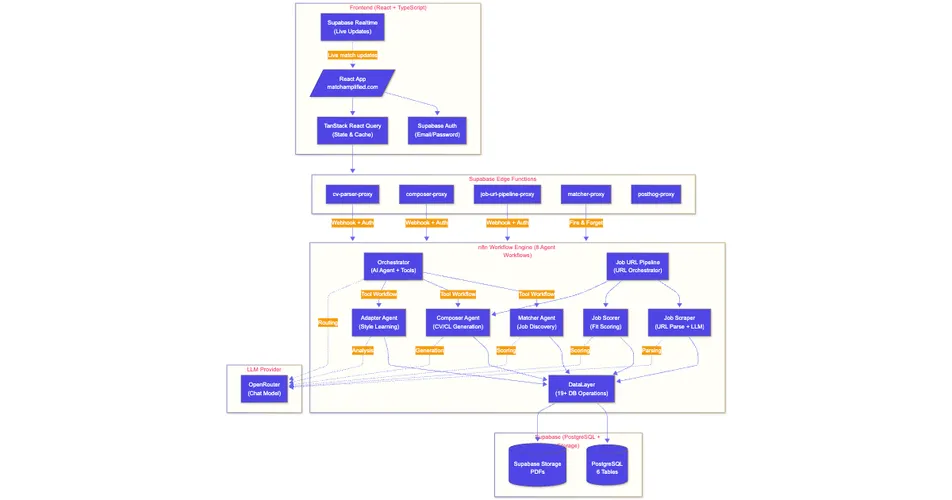
The end-to-end flow: React frontend → Supabase Edge Functions (which validate the user’s JWT and resolve identity) → n8n (the relevant agent or pipeline) → DataLayer → Supabase PostgreSQL or Storage → Supabase Realtime, pushing live updates back to the frontend.
Three things matter about this shape. Every n8n entry point is auth-gated. Every database hop goes through the DataLayer, never directly to PostgreSQL. The frontend never assumes its state is stale: when a match or document is written, Supabase Realtime closes the loop within seconds, so the user sees the change without refreshing.
The DataLayer
Every database read and write goes through one abstraction layer with around twenty named operations. Not because abstractions are virtuous in the abstract; because we needed a single place to enforce schema contracts, audit access and evolve the data model without rewriting every agent.
The operations group by purpose:
- read-user (profiles, preferences, baseline CVs),
- write-style-preferences (the Adapter’s output),
- read-jobs (unprocessed postings or per-user filters),
- write-jobs (deduplicated postings),
- read-matches (paged dashboards or archived sets),
- write-matches (job-user scoped inserts),
- write-documents (versioned saves),
- storage (PDF uploads).
The indirection cost is one extra hop per agent call. Worth it: one place to add a constraint, one place to handle Supabase errors consistently, one place to introduce caching when needed, one schema contract for everyone. If hot-path latency ever becomes a problem, the bypass would be selective rather than wholesale.
Multi-user processing
The biggest backend change since the Buildathon was making the system genuinely multi-user. The MVP was single-user, although the database schema was already set up for multi-user from the start. What had to change was the workflows, the request paths and the scheduling. Previously, the Matcher ran with hardcoded user context. Now it carries an explicit user ID at every hop, scheduling is decoupled from user identity, every write is parallel-safe.
A few components carry this work:
- The Matcher Scheduler runs the periodic cron job and fans out across all active users.
- The Matcher Webhook Router is the entry point for the new user signup → instant-match trigger from the frontend, scoped per user.
- The DataLayer gained operations purpose-built for multi-user iteration: Get All Users, Get Unprocessed Jobs For User, Get Archived Matches For User, Update Job Posting Status.
The cron flow: cron fires at 6am GMT, the Matcher Scheduler queries the DataLayer for all active users, then for each user invokes the Matcher with that user ID as context. The Matcher loads the user’s profile and unprocessed jobs through the DataLayer, scores each one, writes the matches back. The instant-match path on signup runs against the same Matcher entry point with one difference at the end: Supabase Realtime pushes the new matches to that user’s frontend session as they’re written, so the user watches their dashboard fill in real time.
One thing required extra special attention: removing every implicit assumption of “the user”. Workflow variables set once and reused, DB reads without an explicit user ID filter, write operations relying on session context: each had to be audited so user ID was carried end-to-end.
n8n patterns and limitations
n8n is the entire backend, not a side tool. A few things make it work for this kind of system, a few things still hurt.
Visual orchestration and visual debugging. You see the whole flow at a glance and you can mix LLM calls, HTTP requests, SQL and JavaScript in one canvas with no glue code. When something behaves unexpectedly, you step through the executed nodes and inspect the actual data at each one. Saves more hours than any amount of structured logging would.
Sub-workflow visibility (the real-time gap). When a parent workflow invokes a sub-workflow, you can’t watch the sub-workflow’s internal node-level execution live from the parent’s view. Once the run finishes, you can navigate from the parent execution into the sub-workflow’s own execution view; during the run you’re a bit blind. The workaround that helped most: invoking the sub-workflow as standalone with synthetic input to unit-test it in isolation while iterating.
The n8n MCP server. Claude Code can read, edit, validate and deploy n8n workflows directly through the MCP server, which extends AI-assisted development from the React frontend into the orchestration layer itself. The SDK has rough edges, but it’s a real shift in how the workflows get built.
Error handling. The gap I’m still paying down. Many failures (rate limits, PDF generation errors, downstream timeouts) used to return what looked like success or stop the workflow rather than recovering gracefully. The right call for an MVP at a buildathon. Now I’m working through it, mostly by adding explicit error checks at each DataLayer boundary and tightening the failure modes that matter for user-facing paths.
Key engineering decisions
A short list of the non-obvious choices that shaped the system:
-
DataLayer as a single abstraction. One access-control point, schema consistency across workflows, one place to evolve the data model. Cost: one extra hop per DB call. Worth it.
-
Supabase as a unified backend. Auth, storage, Realtime, edge functions in one platform. For a solo project that collapses an enormous amount of deployment and operational overhead.
-
Infrastructure pivots early on. First attempt: Google Sheets as a quick data store (blocked at around forty API calls). Second: Gemini’s free tier (rate-limited fast). Both nudged us toward Supabase and OpenRouter as a model-agnostic gateway. The lesson wasn’t “those tools are bad.” It was “constraints surface the real shape of your system fast.”
-
LLM-based CV parsing. Real-world PDF layout variety is wild. Regex and rule-based parsers give up quickly. An LLM with a schema handles the variability and gets better as the underlying model improves, with no code change needed.
-
Human-in-the-loop as architectural constraint. Not a UX feature bolted on top. The Composer’s PDF gate isn’t a confirmation modal; it’s a workflow boundary the agent cannot bypass.
-
Quality discipline. Test Driven Development (TDD) with currently 188 unit tests and 17 E2E tests. AI-assisted development can introduce subtle regressions; hallucinations in generated documents have direct user consequences. Tests are the safety net.
Closing
The agentic architecture isn’t finished. Multi-source job discovery, the planned Search/Match split, the granular-edit Adapter loop… Plenty still to ship. But it’s stable enough to use and deliberate enough to keep extending. That’s the version of “done” that matters for a side project that’s still actually moving.
Article series on Match Amplified
| # | Topic | JRM Lab | |
|---|---|---|---|
| 1 | The Buildathon and what came after | Introduction to the Buildathon in LinkedIn | From the Buildathon to Match Amplified |
| 2 | The agentic AI architecture | soon | this article |
| 3 | Lovable → Claude Code transition | soon | From Lovable to Claude Code |
| 4 | VPS and infrastructure setup | soon | soon |
| 5 | What’s already built in Match Amplified | soon | soon |
| 6 | The roadmap | soon | soon |
| 7 | The naming process | soon | soon |
| 8 | Where this all goes from here | soon | soon |
| Try it live: | matchamplified.com |
| Product Compass AI Gallery: | Match Amplified entry |
| Full case study: | Match Amplified product case study |
Tags :
Share :